![FictionExpress-tagline (1).png]](https://info.fictionexpress.com/hs-fs/hubfs/FictionExpress-tagline%20(1).png?height=40&name=FictionExpress-tagline%20(1).png)
If you are not an administrator, you will need to check which teacher in your school currently has this role assigned.
-
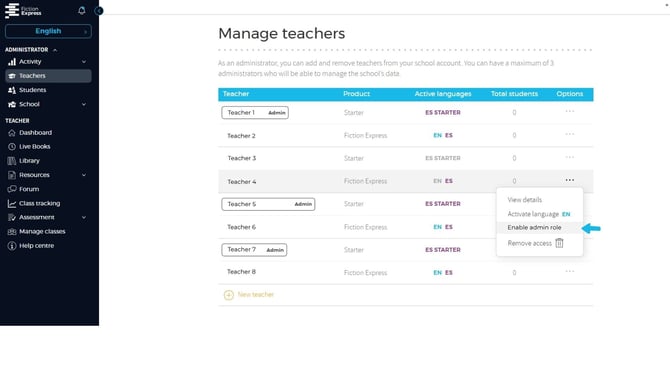
Step 1: Go to Open the side menu from the Administrator Panel and click on [Teachers].
-
Step 2: Inside this section, you will see the [Manage teachers] window, where the list of teachers in your school appears.
-
Step 3: Click on the three dots of the teacher you want to modify to open the drop-down options menu.
-
Step 4: Select the option [Enable admin role] to give administrator access to that teacher.
ℹ️ You can assign up to 7 administrators per school.